Live · Full System Case Study

Northern Fancy Meat —
Online Storefront + In-Store POS

A complete end-to-end business system built for a Yellowknife butcher shop. Customers browse and order online. Staff handle it at the counter. Both sides run off the same database — no manual entry, no missed orders.
Visit the Website Visit the POS See How It Works
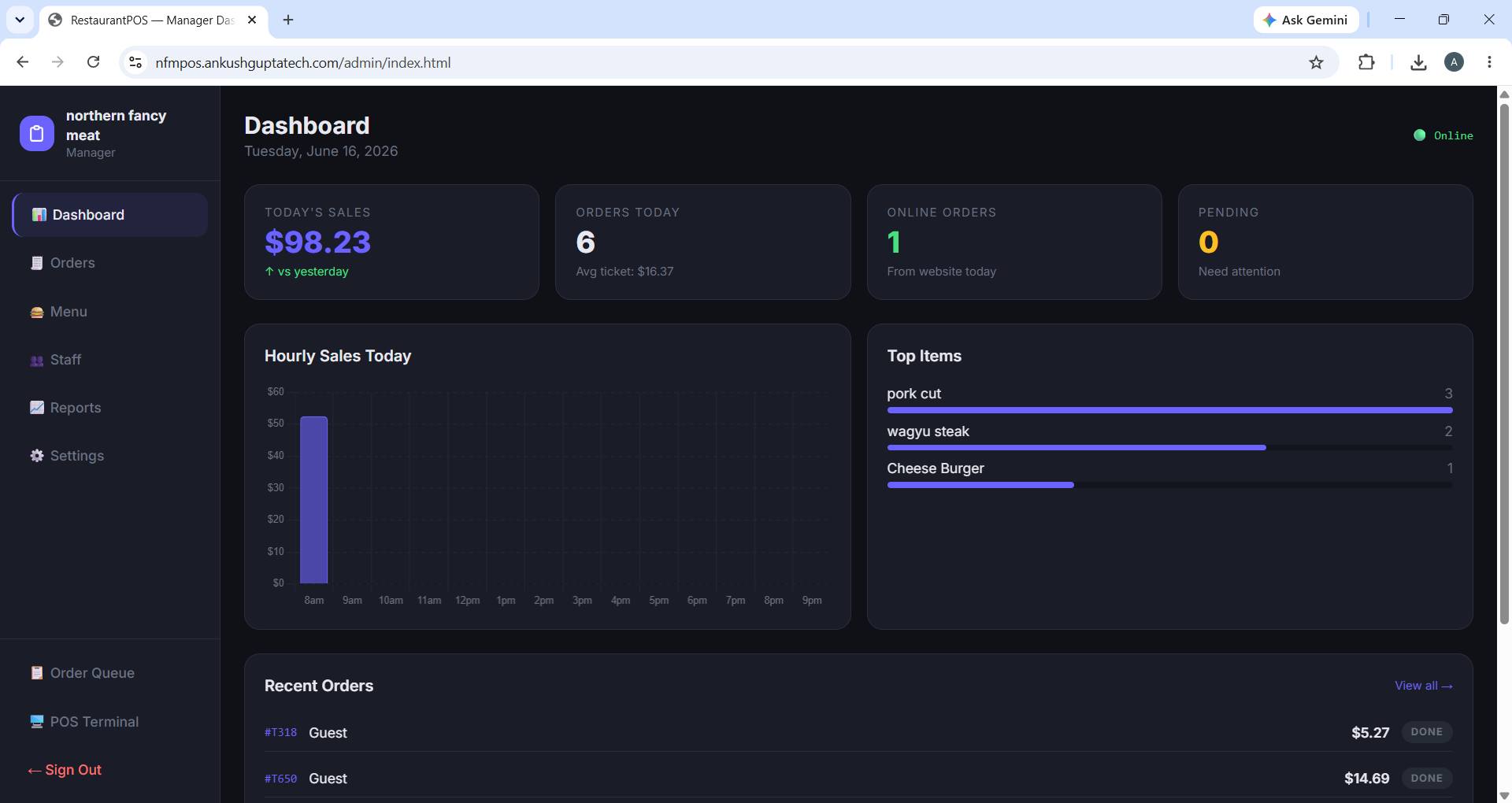
RestaurantPOS Manager Dashboard

Two Systems. One Business.

Northern Fancy Meat needed more than a website — they needed a complete operational system. We built both sides and wired them together.

🌐 The Website

Customer-Facing Storefront

Where customers browse, order, and pay — before they ever walk in the door.

  • Browse cuts by category — Beef, Pork, Lamb, Poultry, Wild Game
  • Weight-based ordering to the hundredth pound (e.g. 1.75 lb)
  • Live inventory — only in-stock items are shown
  • Secure Stripe checkout — paid before pickup
  • Owner dashboard — update products and prices without a developer
  • Mobile-friendly — works on any phone or tablet
🖥️ The POS System

In-Store Point of Sale

What staff use at the counter — and what the owner uses to run the business day to day.

  • Cashier PIN login — fast, touch-first, built for a tablet
  • Online orders, phone orders, and walk-ins in one queue
  • Cash, Stripe card terminal, and split payments
  • Live KDS screen with age alerts — amber at 8 min, red at 15
  • Manager dashboard with hourly sales chart and CSV export
  • Offline mode — keeps working if internet drops, syncs on reconnect

How the Website Works

Built specifically for a butcher shop — weight-based ordering, live inventory, and a direct line from the customer's phone to the shop's counter.

1

Browse by Category

Customers browse cuts of meat organized by category — Beef, Pork, Lamb, Poultry, Wild Game — instead of having to call or visit just to know what's available.

2

Order by Weight

The core feature that makes this actually useful for a butcher shop. Customers specify exactly how many pounds they want — down to the hundredth — the way meat is actually sold.

3

Live Inventory

What's shown online reflects what's actually in the shop that day. Customers don't show up for something that's sold out, and the owner can mark items unavailable instantly.

4

Pay Online via Stripe

Customers pay with a credit card before pickup. The business gets paid upfront, reducing no-shows and making the pickup process faster for everyone.

5

Owner Dashboard

A private, password-protected area where the owner can add products, upload photos, change prices, and mark things sold out — all without touching code or calling a developer.

6

Orders Outside Business Hours

The shop captures orders overnight and on weekends without anyone answering the phone. Fewer missed calls, fewer mistakes from verbal orders, more revenue.

How the POS Works

A fast, touch-first system designed to handle the full reality of a busy counter — online orders, phone orders, walk-ins, and payments, all in one place.

1

Clock In with a PIN

Cashiers clock in with a 4-digit PIN. No passwords to type on a greasy tablet. Managers get full access; cashiers get what they need to serve customers.

2

Build Orders Fast

Browse the menu by category, tap items to add them, enter weight in the notes field for phone orders. Hold an order, start another, recall it later — built for a real counter.

3

Take Any Payment

Cash with automatic change calculation, Stripe card terminal, or split payment across both. All handled in one screen without switching apps or systems.

4

Live Order Queue

A kitchen/counter screen showing every order — New, In Progress, Ready, Done. Orders age amber at 8 minutes and red at 15, so nothing gets forgotten in a rush.

5

Manager Reporting

Today's sales, order count, average ticket, hourly chart, and top-selling items — all visible on the dashboard. Export to CSV when it's time to review the week.

6

Works Offline

If the internet goes down — which matters in Yellowknife — the POS keeps running. Orders save locally to the browser and sync to Firebase the moment the connection returns.

One System, End to End

The website and POS share the same Firebase project. No API to build, no sync to manage — when a customer places an order online, it appears on the counter screen in seconds, tagged as an online order. Staff prepare it, mark it ready, and both systems update together.

Customer orders online
Stripe payment taken
Saved to Firebase
POS queue alerts staff instantly
Order prepared & marked Ready
Customer picks up

What This System Delivers

✔ Orders captured outside business hours
✔ Fewer phone calls tying up staff
✔ No missed online orders — instant POS alerts
✔ Weight-based ordering built in
✔ Paid online before pickup — no no-shows
✔ Cash, card, and split payments at the counter
✔ Live inventory prevents overselling
✔ Owner manages everything without a developer
✔ Role-based access protects against staff errors
✔ Keeps running if the internet goes down
✔ Sales reports and CSV export built in
✔ One system — not two tools duct-taped together

Want a System Like This for Your Business?

Whether you need just the storefront, just the POS, or the full end-to-end system — get in touch and we'll scope it out together.